SK-VPN in Google Cloud
The SK-VPN is available for the Google Cloud.
This section describes how the SK-VPN integrates into a Google Cloud network. The SK-VPN can be used to protect a Virtual Private Cloud (VPC) hosted in Google Cloud. Using Google VPC peering, the SK-VPN can aggregate multiple private networks in Google Cloud and connect to remote cloud or on-premises network(s).
SK-VPN requires three network interfaces: a Management, a Private Network (LAN), and a Public-Network (WAN). The LAN and WAN interfaces must be configured using the GVNIC network interface and support high speed traffic. The MGMT and WAN interfaces require Public IP addresses as they are accessible on the internet. The MGMT interface is further protected using Firewall rules that allow only SSH and HTTPS traffic to the MGMT Interface. The LAN interface use Network Routes to direct traffic destined for remote private networks through the SK-VPN Gateway.
The minimum virtual machine requirements for the SK-VPN is an X86-64 based platform with at least 8 vCPUs (e.g., c2-standard-8). To achieve best performance a compute optimized instance type should be used.
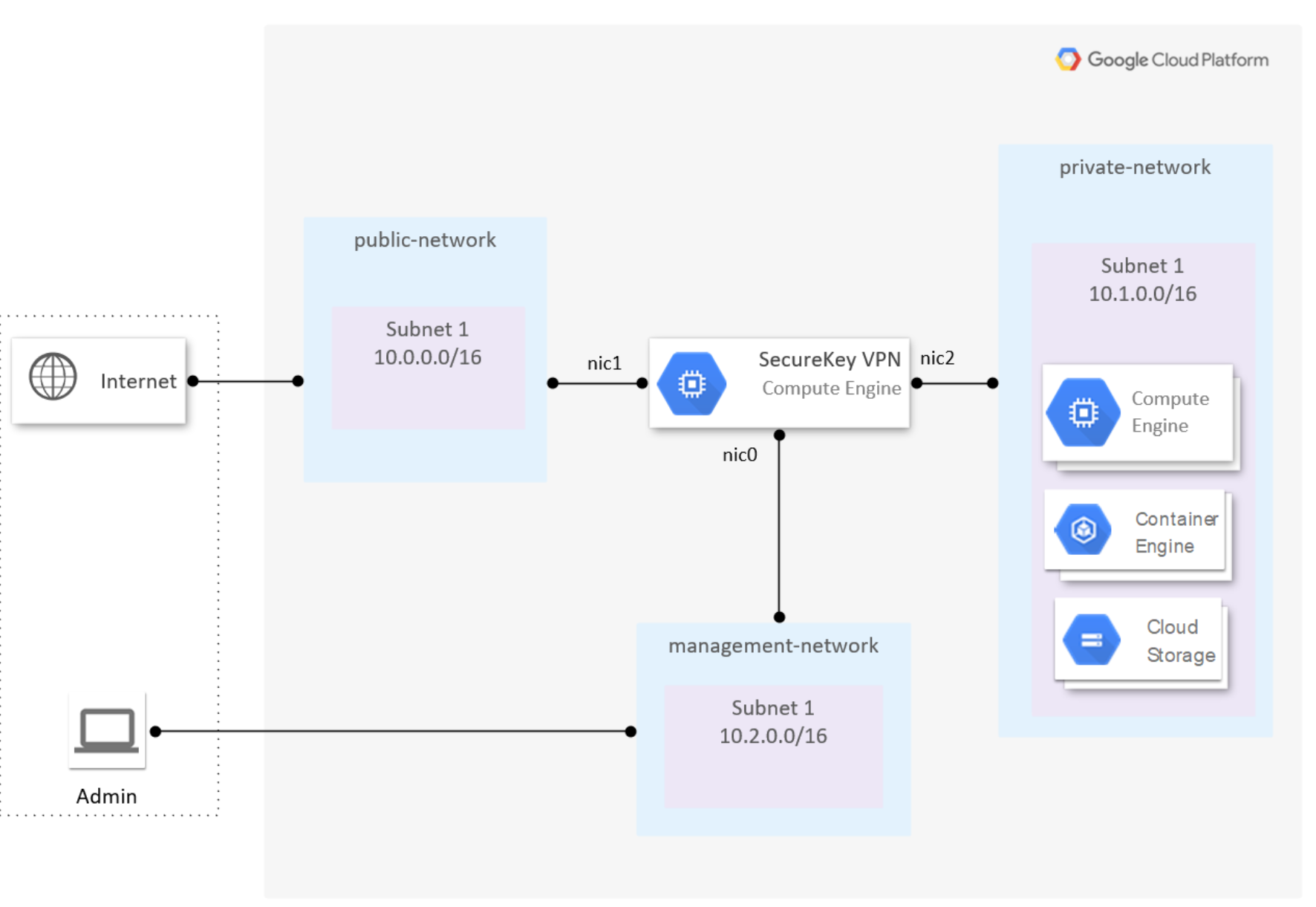
Google Cloud Installation
The gcloud utility can be used to setup the necessary resources for the SK-VPN.
Terraform can be used with the SecureKey Terraform Module
Below is an example script to create the SK-VPN in Google Cloud - update the variables to match your account and network.
Create the Networks and Subnets for the SK-VPN:
# update these to match your account
PROJECT="my-project"
REGION="us-west2"
STORAGE_BUCKET="bucket-1"

# Name the resources required by the SK-VPN
WAN_NET_NAME="wan-vpc"
WAN_PUBLIC_IP_NAME="wan-ip"
WAN_SUBNET_NAME="wan-subnet"
WAN_SUBNET="10.0.0.0/24"

LAN_NET_NAME="lan-vpc"
LAN_SUBNET_NAME="lan-subnet"
LAN_SUBNET="10.0.1.0/24"

MGMT_NET_NAME="mgmt-vpc"
MGMT_PUBLIC_IP_NAME="mgmt-ip"
MGMT_SUBNET_NAME="lan-subnet"
MGMT_SUBNET="10.0.2.0/24"

# create Network and Subnets for WAN
echo "Creating subnet $WAN_NET_NAME and $WAN_SUBNET_NAME"
gcloud compute networks create ${WAN_NET_NAME} --subnet-mode custom
gcloud compute networks subnets create ${WAN_SUBNET_NAME} \
--network ${WAN_NET_NAME} --range ${WAN_SUBNET} --region ${REGION}

# create Network and Subnets for LAN
echo "Creating subnet $LAN_NET_NAME and $LAN_SUBNET_NAME"
gcloud compute networks create ${LAN_NET_NAME} --subnet-mode custom
gcloud compute networks subnets create ${LAN_SUBNET_NAME} \
--network ${LAN_NET_NAME} --range ${LAN_SUBNET} --region ${REGION}

# create Network and Subnets for MGMT
echo "Creating subnet $MGMT_NET_NAME and $MGMT_SUBNET_NAME"
gcloud compute networks create ${MGMT_NET_NAME} --subnet-mode custom
gcloud compute networks subnets create ${MGMT_SUBNET_NAME} \
--network ${MGMT_NET_NAME} --range ${MGMT_SUBNET} --region ${REGION}
Allocate public IPs for WAN and MGMT
# create new public IPs for WAN and MGMT (or use existing available public IPs)
gcloud compute addresses create ${WAN_PUBLIC_IP_NAME} --region ${REGION}
gcloud compute addresses create ${MGMT_PUBLIC_IP_NAME} --region ${REGION}
Create Firewall rules for the MGMT Network:
# create the network Security Group for the MGMT subnet
gcloud compute firewall-rules create allow-https-ssh \
--network ${MGMT_NET_NAME} \
--allow tcp:443,tcp:22 \
--source-ranges 0.0.0.0/0
Setup the SSH key pair:
# save the private key in a secure location
# used for SSH access to the SK-VPN
PRIV_KEY_FILE="ssh_key"
PUB_KEY_FILE="${PRIV_KEY_FILE}.pub"
ssh-keygen -t rsa -b 4096 -N '' -f ${PRIV_KEY_FILE} -C ""

# pre-pend 'sk_admin:' to the public key (required)
SK_ADMIN_KEY_FILE="${PRIV_KEY_FILE}.pub.sk_admin"
echo "sk_admin:$(cat ${PUB_KEY_FILE})" > ${SK_ADMIN_KEY_FILE}
echo "Using SSH Key ${SK_ADMIN_KEY_FILE} for $vm_name"
Create the SK-VPN Virtual Machine:
# update below with the latest SK-VPN version
IMAGE_PROJECT="jet-technology-labs-public"
IMAGE_FAMILY="sk-vpn-prod"

ZONE="${REGION}-a"

# chose a VM size that supports GVNIC, and has at least 8 vCPUs
INSTANCE_NAME="sk-vpn-vm1"
MACHINE_TYPE="c2-standard-8"
# GVNIC_QUEUES can grow depending on the number of vCPUs in the VM
GVNIC_QUEUES="2"

# create the SK-VPN VM
gcloud compute instances create ${INSTANCE_NAME} \
--image-project ${IMAGE_PROJECT} \
--image-family ${IMAGE_FAMILY} \
--machine-type ${MACHINE_TYPE} \
--zone ${ZONE} \
--metadata-from-file ssh-keys=${SK_ADMIN_KEY_FILE} \
--network-interface network=${MGMT_NET_NAME},subnet=${MGMT_SUBNET_NAME},address=${MGMT_PUBLIC_IP_NAME},stack-type=IPV4_ONLY,nic-type=VIRTIO_NET \
--network-interface network=${WAN_NET_NAME},subnet=${WAN_SUBNET_NAME},address=${WAN_PUBLIC_IP_NAME},stack-type=IPV4_ONLY,nic-type=GVNIC,queue-count=${GVNIC_QUEUES} \
--network-interface network=${LAN_NET_NAME},subnet=${LAN_SUBNET_NAME},no-address,stack-type=IPV4_ONLY,nic-type=GVNIC,queue-count=${GVNIC_QUEUES} \
--can-ip-forward
Note
The order of the Network Interfaces should be: MGMT, WAN, LAN. The SK-VPN uses the assigned private IP address (based on Subnets in Google Cloud) to set the WAN and LAN interface roles on the system. These roles may be changed as needed. Using the below IP address scheme will ensure proper WAN and LAN role assignment:
The WAN Network Private IP address should be of the form: 10.X.0.X The LAN Network Private IP address should be of the form: 10.X.1.X
Initial Login
Once the VM has been created, login using SSH to the VM:
# The SSH Private Key file
PRIV_KEY_FILE="<path_to_SSH_private_key>"

echo "MGMT Public IP:"
MGMT_PUB_IP=$(gcloud compute instances describe ${INSTANCE_NAME} --zone $ZONE --format='get(networkInterfaces[0].accessConfigs[0].natIP)')

ssh -i ${PRIV_KEY_FILE} sk_admin@${MGMT_PUB_IP}
Note
SSH and HTTPS are enabled by default for the VM. See Adding an Initial User for details on how to add an initial user.
Traffic setup
To allow traffic in a private network (LAN) to be sent through the SK-VPN the following must be done:
Setup a Firewall rule to allow ingress LAN traffic to the SK-VPN:
fw_name="lan-allow-all-ingress"
gcloud compute firewall-rules create $fw_name \
--network ${LAN_NET_NAME} \
--allow all \
--priority 1000 \
--source-ranges 0.0.0.0/0
Setup a static route to send traffic through the SK-VPN:
# get the Private IP address for the SK_VPN's LAN subnet
gw_ip=$(gcloud compute instances describe ${INSTANCE_NAME} --zone ${ZONE} --format='get(networkInterfaces[2].networkIP)')

route_name="remote-lan-to-sk-vpn"
# Route traffic in 10.0.1.0/24 through the SK_VPN
gcloud compute routes create $route_name \
--network ${LAN_NET_NAME} \
--next-hop-address ${gw_ip} \
--destination-range 10.0.1.0/24