ACL Setup
SK-VPN supports Access Control Lists (ACLs) for the Dataplane. ACL rules are configured to deny or permit traffic based on various packet fields. The default ACL is configured to deny all traffic.
There are two types of ACLs: MACIP ACLs - rules based on MAC or IP address - performance is better than IP ACLs IP ACLs - rules based on IP address and other Layer3 and Layer4 network fields
ACL rules follow a priority ordering where ACLs with the highest priority are applied first. ACL Rules are applied to a specific interface role. LAN or WAN are the currently supported interface roles.
Note
The Management Interface is not affected by the configuration of the ACLs. Management Interface firewalling is performed by the management software for the SK-VPN.
Setup ACL Rules
The SK-VPN allows ACL rules to be created and managed using the Web UI and REST API.
The Web UI Access Control Page is used to configure ACL rules:

Adding a new rule is done by selecting the “Add Rule” button on the top of the Web UI:
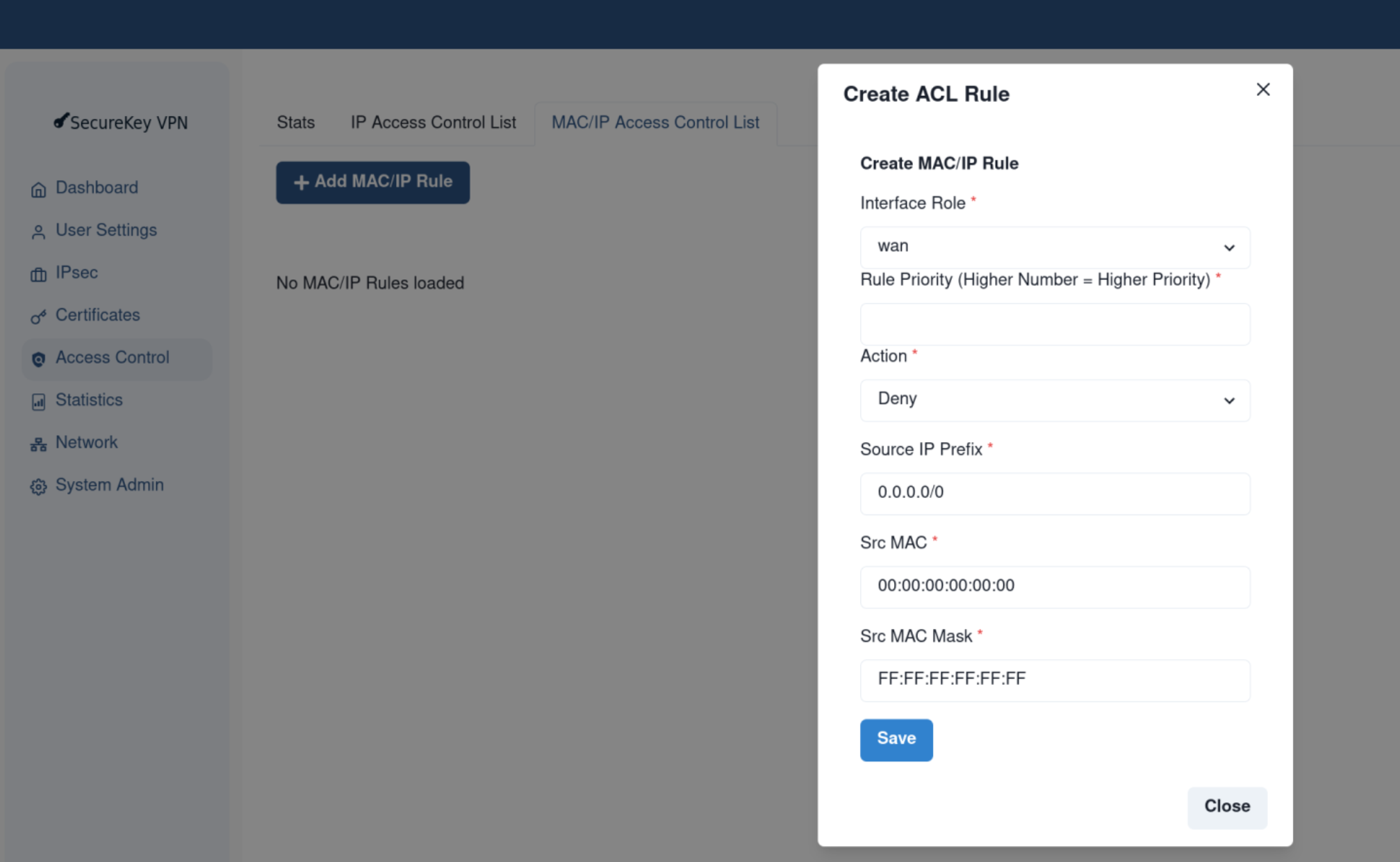
ACL API
The REST API provides two methods to configure ACL rules: The recommended way is to replace the entire set of rules using the “PUT” method.
Set the current IP ACL Rules: PUT
/acl/rules/ipSet the current MACIP ACL Rules: PUT
/acl/rules/macipPUT an empty list to delete all current ACL rules
Alternatively the “POST” method can be used to add new rules which are applied based on the ACL priorities. It is recommended when adding rules to leave gaps in the priority ordering to allow for future rule expansion.
Add an IP Rules: PUT
/acl/rules/ipAdd a MACIP Rules: PUT
/acl/rules/macipDelete an ACL Rule: DELETE
/acl/rules/ipDelete a MACIP Rule: DELETE
/acl/rules/macip
View ACL Rules
The SK-VPN allows ACL rules to be viewed using the REST API:
Get the current IP Rules: GET
/acl/rules/ipGet the current IP Rules applied to the WAN or LAN interface: GET
/acl/rules/ip/<interface_role>Get the current MACIP Rules: GET
/acl/rules/macipGet the current MACIP Rules applied to the WAN or LAN interface: GET
/acl/rules/macip/<interface_role>
View ACL Stats
The Web UI Access Control -> Stats page is used to view ACL statistics. Additional ACL drop/deny coutners are available in Statistics -> Errors.

.
Note
The REST API provides statistics on ACL rule violations (deny drops) are reported in the /stats/errors statistics see System Statistics
Example ACL Rules
REST API methods are provided in the python sk_client library sk_client.client_acl
Example: ACL rule to allow all traffic on both WAN and LAN interfaces - from sk_client.client_acl.set_acl_allow_all()
from sk_schemas.intf import IfaceRoleTypes
from sk_schemas.acl import AclAction, IpAclRule, IpProtocol, MacIpAclRule

def set_acl_allow_all(self) -> bool:
    for is_input in [True, False]:
        for role in [IfaceRoleTypes.LAN, IfaceRoleTypes.WAN]:
            rule = IpAclRule(
                is_permit=AclAction.ACL_ACTION_API_PERMIT,
                src_prefix=IPv4Network("0.0.0.0/0"),
                dst_prefix=IPv4Network("0.0.0.0/0"),
                proto=IpProtocol.IP_API_PROTO_HOPOPT,
                src_port_first=0,
                src_port_last=65535,
                dst_port_first=0,
                dst_port_last=65535,
                tcp_flags_mask=0,
                tcp_flags_value=0,
                is_input=is_input,
                priority=0,
                interface_role=role,
            )
            resp = self.add_acl_rule(rule=rule)
            if not resp.status_code == HTTPStatus.OK:
                return False
    return True
Example: A more restricted ACL rule for the WAN interface to allow necessary traffic for IPsec:
from sk_schemas.intf import IfaceRoleTypes
from sk_schemas.acl import AclAction, IpAclRule, IpProtocol, MacIpAclRule

def set_acl_wan_allow_ipsec(self):
    for proto in [
        IpProtocol.IP_API_PROTO_UDP,
        IpProtocol.IP_API_PROTO_ESP,
    ]:
        for is_input in [True, False]:
            ike_wan_allow = IpAclRule(
                is_permit=AclAction.ACL_ACTION_API_PERMIT,
                src_prefix=IPv4Network("0.0.0.0/0"),
                dst_prefix=IPv4Network("0.0.0.0/0"),
                proto=proto,
                src_port_first=0,
                src_port_last=(65535), # can be further restricted based on protocol
                dst_port_first=(0),
                dst_port_last=(65535),
                tcp_flags_mask=0,
                tcp_flags_value=0,
                priority=100,  # ensure this is higher priority than other deny rules
                is_input=is_input,
                interface_role=IfaceRoleTypes.WAN,
            )
            self.add_acl_rule(rule=rule)
Next Steps
Once the SK-VPN is configured to allow the desired traffic on both LAN and WAN interfaces, IPsec connections may be configured see IPsec Setup