Certificates
Certificate Support
The SK-VPN supports Certificate Based Authentication.
The SK-VPN enforces algorithm compliance for internally generated and user uploaded IPsec Certificates.
IPsec Certificates must meet the following standards:
CNSA v1.0 Algorithms: CNSA v1.0
RSA (3072-bit+)
EC (P-384+)
Hashes (SHA-384+)
Certificate Import
The SK-VPN allows admins to import Certificates which can be used for authentication. The SK-VPN supports PEM formatted X509 Certificates.
Import using Web Interface
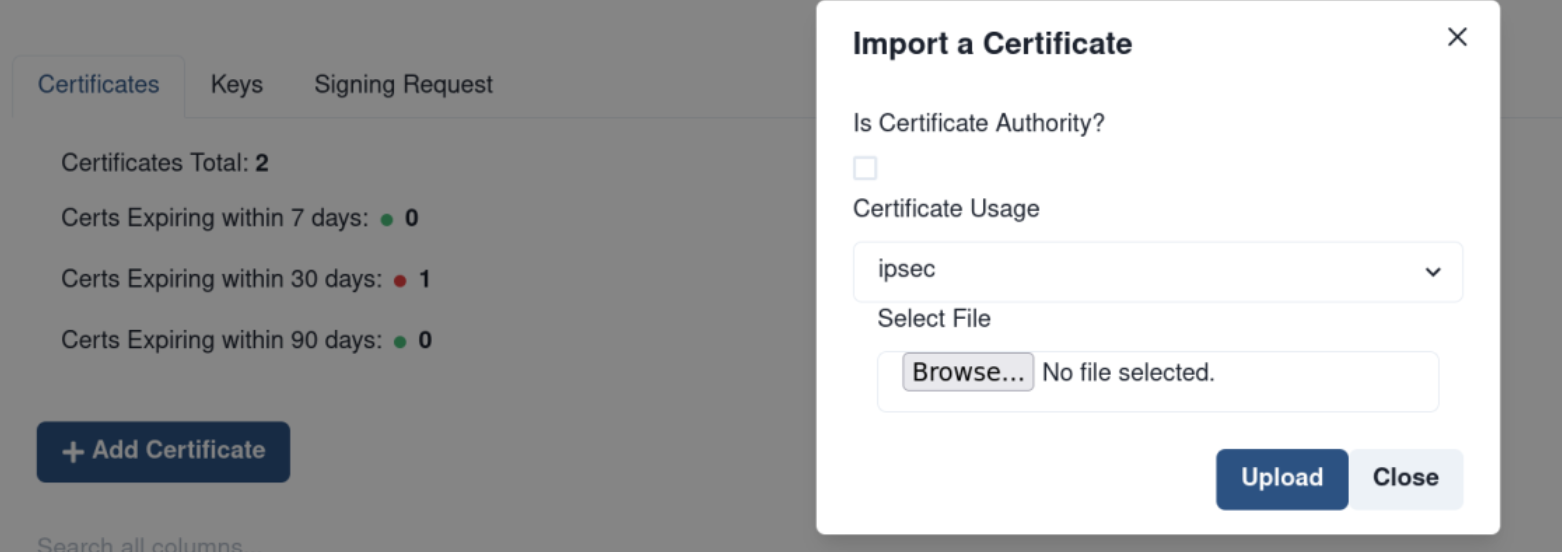
Import CAs and User Certificates using the Certificates -> Add Certificate:
Import using REST API
The REST API can be used to import Certificates:
POST /certs/users
POST /certs/tls/client-cert
POST /certs/syslog/ca
Certificate Signing Request (CSR)
The SK-VPN supports Certificate Signing Requests (CSR) which can be used to generate private keys local to the SK-VPN and export a CSR. The CSR can then be signed by a Certificate Authority (CA) to generate a signed Certificate. This signed Certificate can be uploaded to the SK-VPN and used to authenticate the SK-VPN.
This process is used in mutliple scenarios including generating IPsec identity certificates, Syslog client certificates, and HTTPS certificates for Web authentication.
CSR using Web Interface
The SK-VPN Web Interface Certificates -> Signing Request can be used to create CSRs and upload signed certificates:

The CSR PEM formatted data is displayed in the Signing Request Table and can be dowloaded then signed by a Certificate Authority. To Upload the signed certificate to the SK-VPN, find the CSR in the Signing Request Table and click on the Actions Menu -> Upload Signed Certificate. Select the signed certificate file and select the usage field for how this certificate will be used.

CSR using REST API
In order to generate a CSR, use the REST API:
(Pre) Generate a Certificate Authority (CA) Root Certificate and Private Key pair which will be used to sign the Certificate
Export a Certificate Signing Request: POST /cert/signing-request` * Note the SK-VPN generates a Private Key and exports the CSR for the user to sign with the CA.
Sign the CSR with the CA Root Private Key
Upload the signed certificate to the SK-VPN via the POST /cert/signed_csr` endpoint with the usage field set to SYSLOG_CLIENT
Verify the Certificate detials using the GET /cert/syslog/client-cert, /cert/syslog/ca-cert and /cert/syslog/ca
Enable syslog authentication: POST sys/syslog/settings with the enable_authentication field set to True
Certificate Information and Details
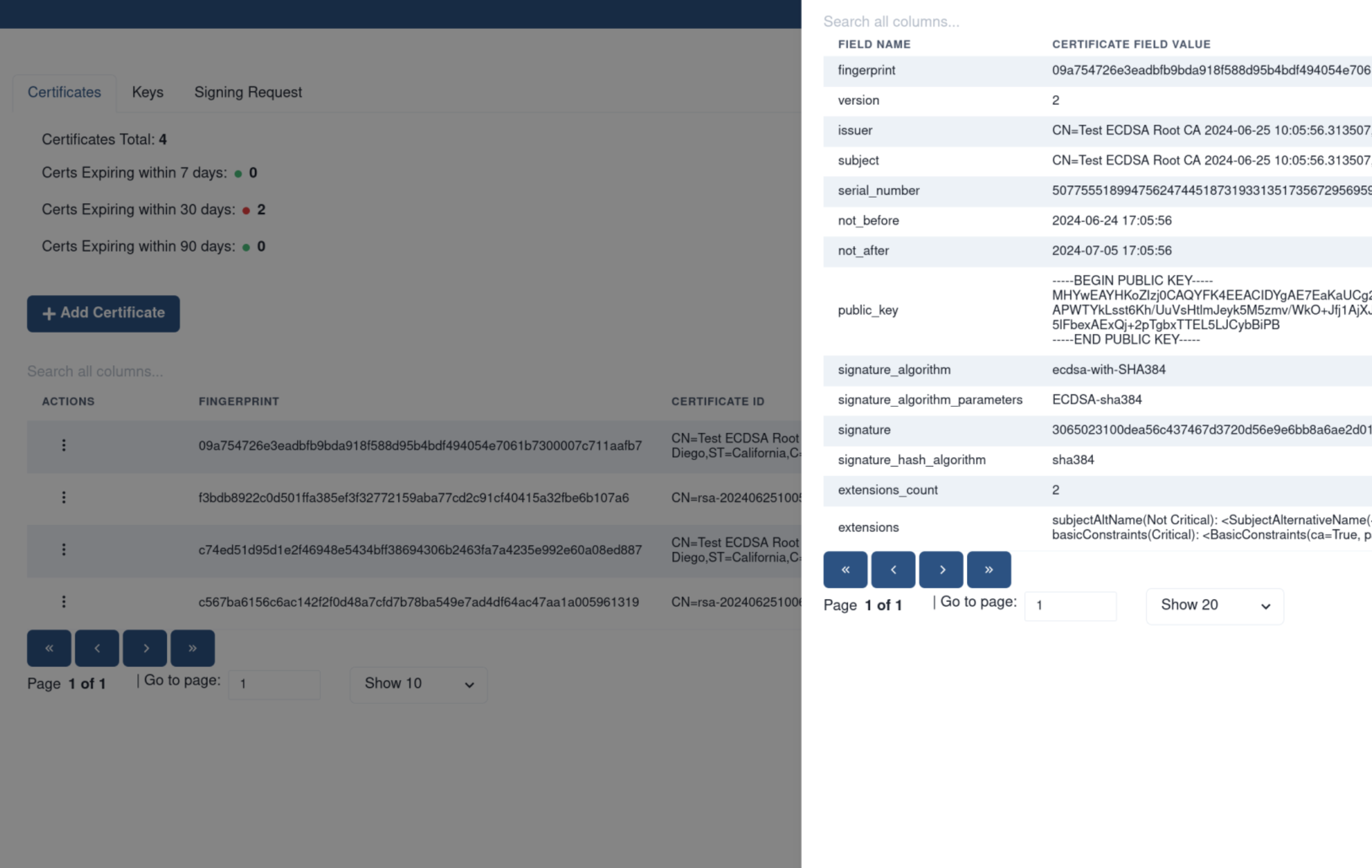
The SK-VPN provides information and details of all certificates on the system. Certificate Information enpoints give a summary of the certificate and contains a Unique Identifier called the fingerprint which is used in other Certificate Operations. Certificate Details endpoints give the full description of the certificate and contains all fields in the certificate.
Web Interface Certificate Information
The SK-VPN Web Interface can be used to view details of and manage certificates on the Certificates Page:
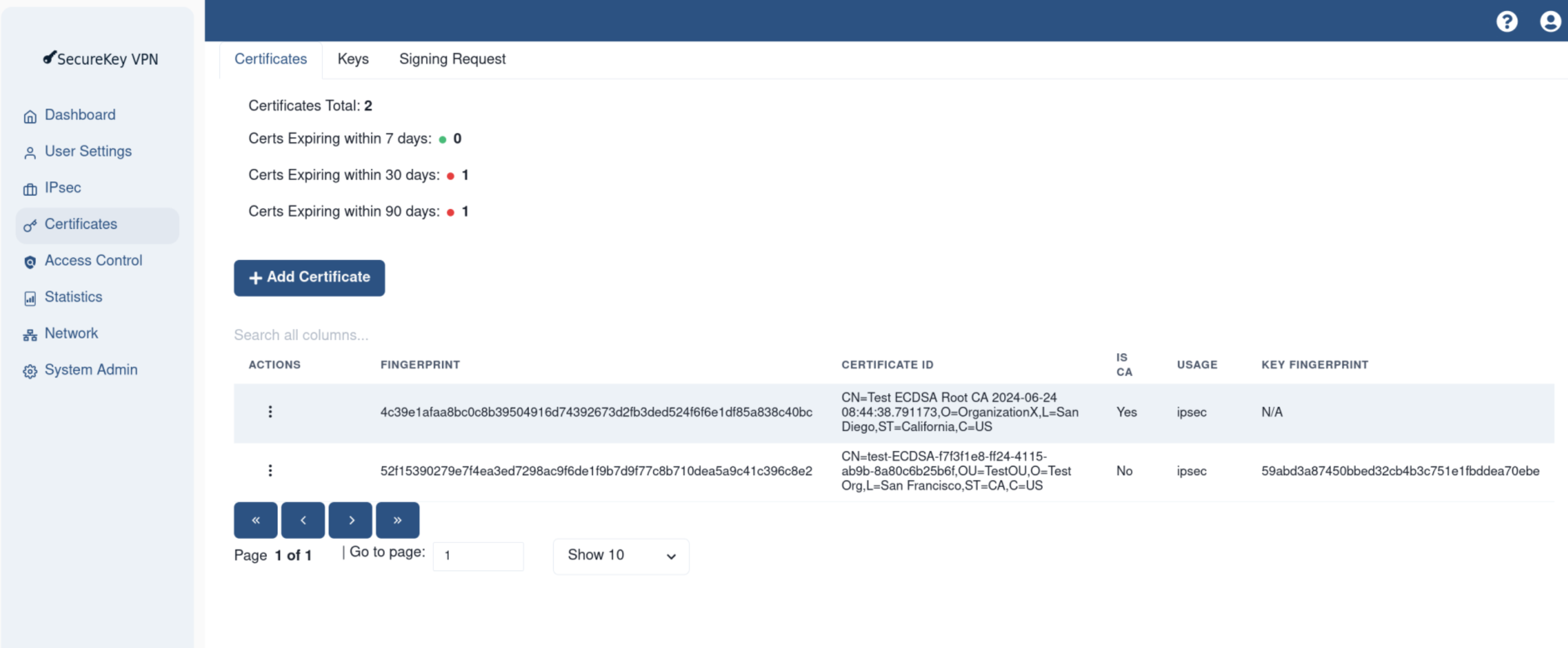
To view the details of a certificate, click on the Actions Menu -> View Details which opens a slideout containing the full details of the certificate.
REST API Certificate Information
The REST API can be used to get the summary information of certificates:
GET /cert/certs
GET /cert/ca
GET /cert/user
The REST API can be used to check the details of all certificates:
GET /cert/certs
GET /cert/details
GET /cert/tls/server-cert
GET /cert/syslog/ca
GET /cert/syslog/client-cert
Certificate Revocation Lists
The SK-VPN does not support Certificate Revocation List (CRL) used to revoke certificates. This feature will be added in a future update.
Currently the SK-VPN allows management of Certificates via the REST API, including deletion of Certificates. IPsec Connections may be configured for re-authentication which does not require CRLs, but does enforce Certificate Date validation.
Example Certificate Operations
This section contains example OpenSSL commands that can be used to generate and sign certificates.
Example CA Certificate Generation
The below OpenSSL commands can be used to generate a self-signed (Root) Certificate Authority which can be used to sign a Certificate Signing Request (CSR) for use by the SK-VPN.
openssl req -x509 -newkey rsa:4096 -sha384 -days 3650 -keyout root_key.pem -out root_cert.pem -config openssl_root.conf
OpenSSL Configuration file (openssl_root.conf)
####################################################################
[ ca ]
default_ca    = CA_default      # The default ca section

[ CA_default ]
dir              = .
certs            = $dir
crl_dir          = $dir
new_certs_dir    = $dir
database         = $dir/syslog-root-ca-index.txt
serial           = $dir/syslog-root-ca.srl

default_days     = 3650         # How long to certify for
default_crl_days = 30           # How long before next CRL
default_md       = sha384       # Use public key default MD
preserve         = no           # Keep passed DN ordering

x509_extensions  = v3_ca        # The extensions to add to the cert

email_in_dn     = no            # Don't concat the email in the DN
copy_extensions = copy          # Required to copy SANs from CSR to cert

policy            = signing_policy

####################################################################
[ req ]
default_bits       = 4096
distinguished_name = ca_distinguished_name
x509_extensions    = v3_ca
string_mask        = utf8only

####################################################################
[ ca_distinguished_name ]
countryName         = Country Name (2 letter code)
countryName_default = US

stateOrProvinceName         = State or Province Name (full name)
stateOrProvinceName_default = California


organizationName            = Organization Name (eg, company)
organizationName_default    = JET Technology Labs Inc

commonName         = Common Name (e.g. server FQDN or YOUR name)
commonName_default = TEST Root CA 1

emailAddress         = Email Address
emailAddress_default = info@jettechlabs.com

####################################################################
[ v3_ca ]

subjectKeyIdentifier   = hash
authorityKeyIdentifier = keyid:always, issuer
basicConstraints       = critical, CA:true
keyUsage               = keyCertSign, cRLSign

####################################################################
[ v3_intermediate_ca ]

subjectKeyIdentifier   = hash
authorityKeyIdentifier = keyid:always, issuer
basicConstraints = critical, CA:true, pathlen:0
keyUsage = critical, digitalSignature, keyCertSign, cRLSign
extendedKeyUsage = serverAuth

####################################################################
[ signing_policy ]
countryName            = optional
stateOrProvinceName    = optional
localityName           = optional
organizationName       = optional
organizationalUnitName = optional
commonName             = supplied
emailAddress           = optional

####################################################################
[ signing_req ]
subjectKeyIdentifier   = hash
authorityKeyIdentifier = keyid,issuer
basicConstraints       = CA:FALSE
keyUsage               = digitalSignature, keyEncipherment
Example Certificate Generation
The below OpenSSL (v3.0+) commands can be used to generate a Certificate Signing Request (CSR).
# below adds subjectAltName to the CSR
openssl req -new -nodes -sha384 \
-subj "/CN=Test Certificate/O=Organization/ST=CA/C=US" \
-extensions v3_req \
-reqexts SAN \
-key test_key.pem \
-out test.csr \
-config <(cat /etc/ssl/openssl.cnf <(printf "[SAN]\nsubjectAltName=DNS:10.10.10.1"))
Example Certificate Signing
A PEM formatted CSR file is exported from SK-VPN in most cases. The below OpenSSL (v3.0+) commands can be used to sign the CSR using the CA Certificate and Private Key.
# Sign the CSR using the CA certificate and Private Key
openssl x509 -req -days 3650 -in test.csr \
-CA root_cert.pem -CAkey root_key.pem \
-CAcreateserial \
-out test_cert.pem \
-extfile <(cat /etc/ssl/openssl.cnf <(printf "[SAN]\nsubjectAltName=DNS:10.10.10.1")) \
-extensions SAN