SK-VPN in AWS
The SK-VPN is available for the AWS Marketplace.
This section describes how the SK-VPN integrates into an AWS network. The SK-VPN can be used to protect a Virtual Private Cloud (VPC) hosted in AWS. The SK-VPN can aggregate multiple private networks in AWS and connect to remote cloud or on-premises network(s).
SK-VPN requires the following AWS resources:
1 VPC for the SK-VPN
2 Public Interfaces, Public Subnets, and Elastic IPs (MGMT and WAN)
1 Private Interface, Private Subnet (LAN)
1 Internet Gateway (for the VPC)
Security Groups and Routing tables to forward traffic to the SK-VPN
The LAN and WAN interfaces must be configured using the Elastic Network Adaptor (ENA) interfaces and they support high speed traffic.
The MGMT and WAN interfaces require Elastic (Public IP) addresses as they are accessible on the internet.
The MGMT interface should be confiugred with a Security Group to allow only SSH and HTTPS traffic to the MGMT Interface.
The LAN interface use Network Routes to direct traffic destined for remote private networks through the SK-VPN Gateway.
An internet Gatway should be used to allow MGMT and WAN traffic to the internet.
The minimum virtual machine requirements for the SK-VPN is an X86-64 based platform with at least 8 vCPUs (e.g., c6in.2xlarge). To achieve best performance a compute optimized (C instance) with high Network Bandwidth should be used.
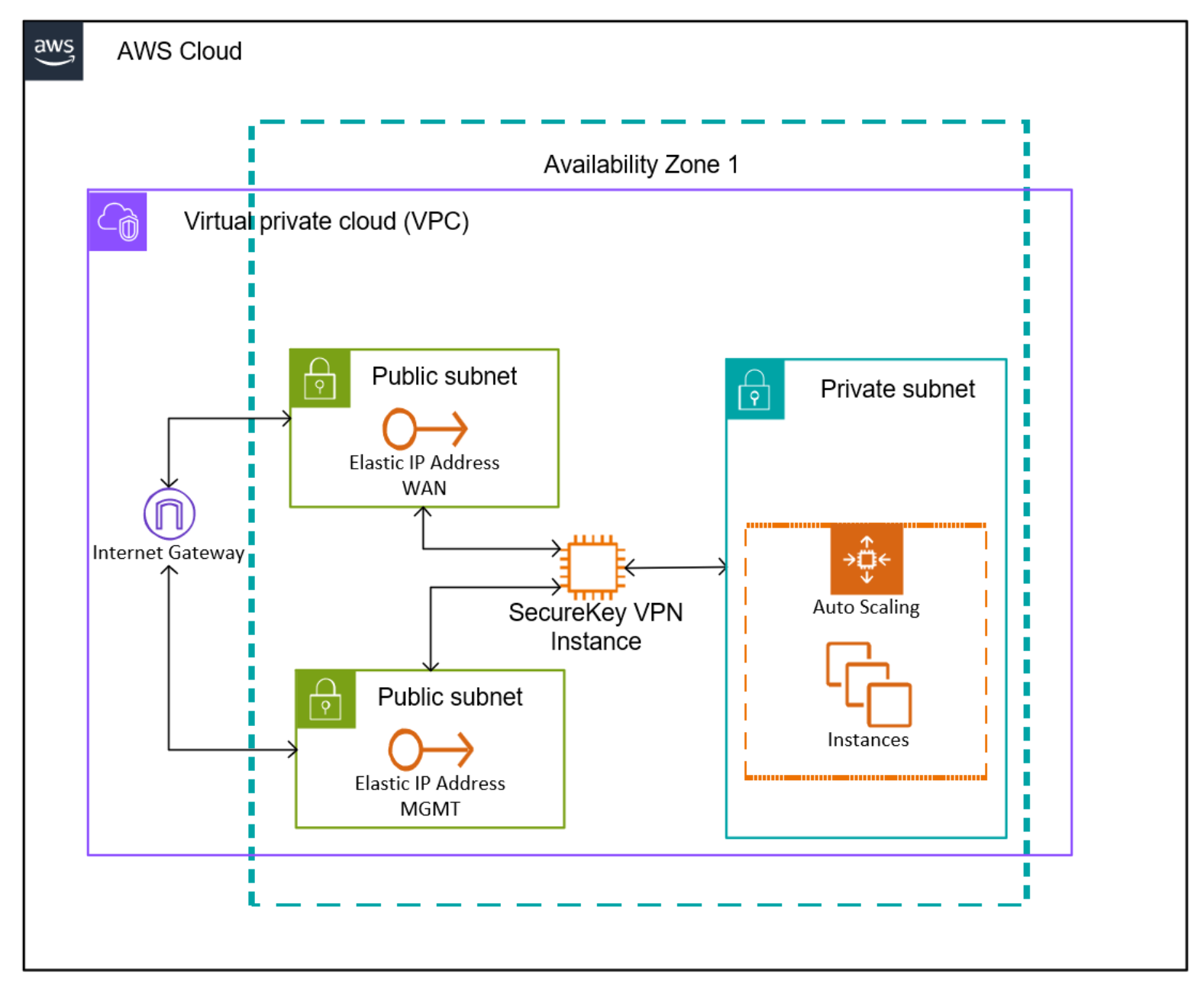
AWS Cloud Installation
It is recommended to use the SecureKey Terraform Module
The AWS CLI utility can also be used to setup the necessary resources for the SK-VPN.